
In an era where vehicle touchscreens are increasingly dominating dashboards, potentially overwhelming drivers with complex interfaces, Rivian is emerging as a leader in user-friendly automotive technology. The California-based electric vehicle manufacturer’s sophisticated and intuitive infotainment system in its R1S SUV and R1T pickup has impressed reviewers, to the point where the absence of Apple CarPlay is not keenly felt.
A Digital Command Center Designed for Ease of Use
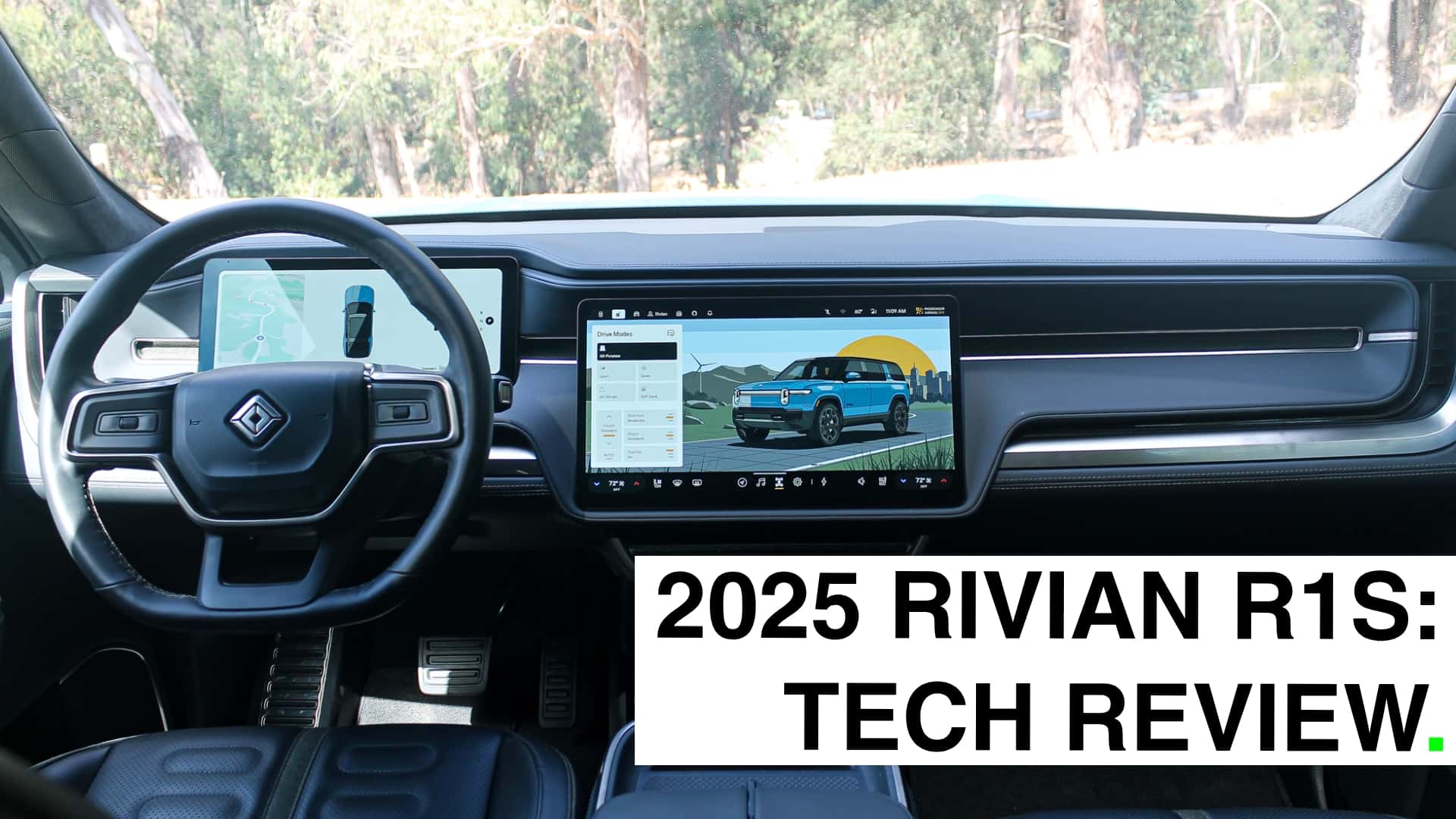
The Rivian R1S features a prominent 15-inch, landscape-oriented touchscreen integrated seamlessly into the cabin. This central display serves as the control hub for nearly all vehicle functions, with only the essential driving controls like the throttle, brakes, and steering wheel remaining physical.

Complementing the main screen is a 12-inch driver display positioned behind the steering wheel. This screen offers clear visuals of critical driving information, including speed, remaining range, battery percentage, energy efficiency metrics, turn-by-turn navigation, and cruise control status. It strikes a balance as a mid-sized digital driver cluster.
A significant under-the-hood enhancement for the 2025 R1 lineup is a redesigned electrical architecture. This system utilizes fewer, but more powerful, onboard computers, with a dedicated unit managing the infotainment system. Both the hardware and the software are developed entirely in-house by Rivian, a notable contrast to many legacy automakers that rely on a larger number of computers for various vehicle functions.
Intuitive Menus and Engaging Graphics
Rivian’s infotainment interface is lauded not only for its aesthetic appeal but also for its thoughtful design and responsive user experience. The overall layout and functionality are described as refreshingly intuitive, drawing parallels to the user-friendly design principles found in Apple products.
While some tasks may require a brief learning curve, users familiar with smartphones and computers will find the system easy to navigate. Swipes, pinches, and taps are met with smooth, immediate responses, akin to using a high-quality tech device. The system’s minimalist aesthetic and well-executed graphics and animations contribute to an engaging and pleasant user experience.
The system’s attention to detail is evident in features like the dynamic vehicle settings page. When switching between drive modes, the on-screen depiction of the Rivian transforms accordingly—showing the vehicle on a track for Sport mode or in a snowy landscape for Snow mode. Engaging Camp Mode displays a serene scene with a campfire. Less frequently used settings are accompanied by helpful diagrams and animations that clarify their purpose.
Rivian recently updated its user interface, opting for more stylized vehicle representations over realistic ones, which are noted to be visually appealing. The system eschews a traditional home screen, instead positioning important functions around the screen’s perimeter. A customizable toolbar at the bottom provides quick access to the user’s four most frequently used features.

Key controls, such as the door-lock toggle, are located in the upper left corner. Tapping this icon reveals a dropdown menu that displays a top-down view of the vehicle, mirroring its color. This view allows for control of the charge port, trunk, frunk, and exterior lighting. Climate settings are readily accessible in the bottom corners, enabling adjustments to temperature and seat heating/cooling without needing to navigate through deep menus.
While some traditionalists might find the reliance on screen-based controls for functions like vent adjustments inconvenient, Rivian incorporates clever solutions. For instance, mirror and steering-wheel adjustment controls appear on the screen automatically when the seat position is changed, recognizing the relationship between these settings.
Despite the extensive range of settings and capabilities, the Rivian OS avoids feeling cluttered. Users can generally find what they need with relative ease, achieving a good grasp of the system’s layout quickly.
The Driver’s Display: Focused and Functional
The driver-facing screen complements the central display with a more focused set of functionalities. It is designed to be easy on the eyes while still offering several useful features.
When a turn signal is activated, a live camera feed of the corresponding blind spot appears on the screen, offering an additional layer of awareness beyond traditional side mirrors.
A compact map view is displayed on the left side of the screen, providing directional guidance. While not as customizable as some systems, users can opt to display energy efficiency or tire pressure information instead of the map.
A small, centered graphic of the R1S or R1T accurately reflects the vehicle’s status. This visualization extends to showing when doors or trunks are open while parked. At low speeds, visual cues around the graphic indicate proximity to obstacles. While driving, a visualization of surrounding traffic can be helpful during assisted highway driving, illustrating what the car’s sensors are detecting.
Navigating Without Smartphone Mirroring
A significant aspect of Rivian’s infotainment strategy is its deliberate decision not to include Apple CarPlay or Android Auto. Instead, the company prioritizes its proprietary, in-house software ecosystem. This approach allows Rivian to maintain full control over the user experience and integrate EV-specific features more deeply.
The built-in navigation system offers a user-friendly interface with a clean design, comparable to Google Maps. Users can toggle between satellite and basic map views, as well as 2D and 3D perspectives. Points of interest display star ratings, providing quick information.
Crucially, the navigation excels in EV-specific functionalities. When planning a route, it estimates the remaining range upon arrival at the destination. This feature, though essential for EVs, is not universally implemented across the industry. Users can set a desired minimum ending range, which the system factors into its charging stop recommendations.
Locating charging stations is simplified through the map interface. Users can choose to have charging sites displayed continuously and can filter them by charging speed, network provider, and real-time availability. The system indicates the number of available stalls at each station, a vital feature to avoid wait times.
Popular integrated apps like Spotify function seamlessly within the system, offering a comparable experience to using the app on a smartphone. This integration extends to Apple Music, and Rivian also supports Audible, TuneIn, and Tidal, with plans to add more services.
The interface allows for side-by-side viewing of navigation and entertainment content through a vertical window on the right side of the map. This window can be easily swiped away for a full-screen map view.
A notable consideration is the optional subscription fee of $14.99 per month for the data connection required for premium services like Spotify and Apple Music. This pricing model underscores the importance of a compelling user experience; if the software is subpar, users are unlikely to pay. A well-executed interface, however, can justify the subscription cost, offering a valuable lesson for automakers focusing on software and subscriptions.
Areas for Improvement in the User Experience
While Rivian’s infotainment system is largely impressive, a few minor drawbacks have been noted.
The operation of the air vents via the touchscreen continues to be a point of contention for some users. Adjusting fan speed, in particular, requires multiple steps, which can be inconvenient for those who frequently fine-tune climate settings. Rivian has introduced customizable presets for vents, which may alleviate issues for drivers with differing preferences.
A frustrating quirk in the navigation system is its tendency to constantly recenter on the vehicle’s current location, even when the user wishes to explore other areas of the map, such as when searching for charging stations.
Voice commands, powered by Alexa, are generally functional for tasks like navigation and music playback. However, there have been instances where Alexa struggled with basic requests, such as controlling seat heating or ventilation, despite its known capabilities.
Conclusion
In the evolving landscape of in-car technology, Rivian’s infotainment system stands out as a benchmark for what consumers expect from a modern electric vehicle. The company’s commitment to an in-house, user-centric approach delivers a sophisticated and highly functional digital experience that effectively eliminates the perceived need for smartphone mirroring solutions like Apple CarPlay.